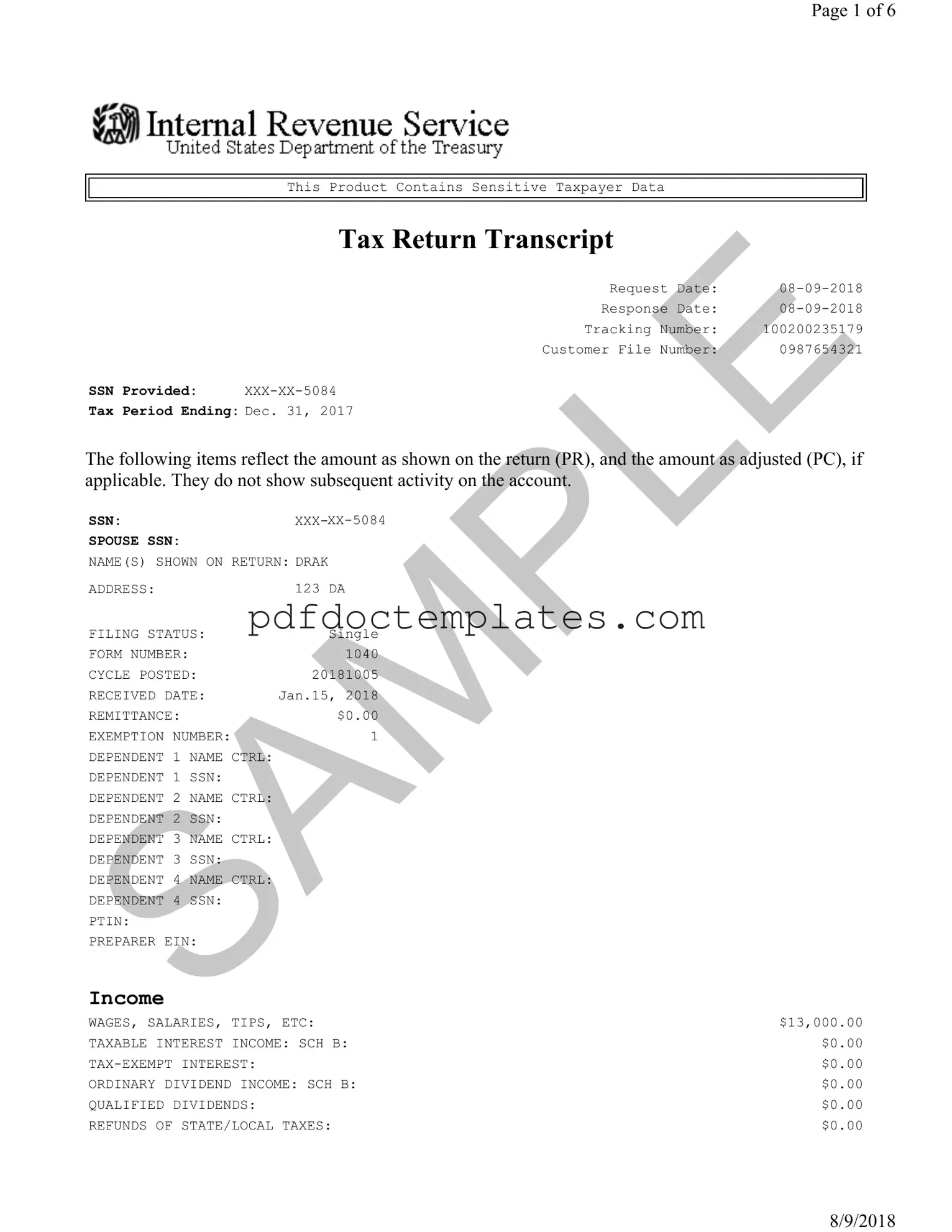
Download Sample Tax Return Transcript Template
Misconceptions
- Misconception 1: The Sample Tax Return Transcript shows all account activity.
- Misconception 2: A Tax Return Transcript is the same as a full tax return.
- Misconception 3: You cannot obtain a Tax Return Transcript if you filed your taxes electronically.
- Misconception 4: The Tax Return Transcript can be used as proof of income for all purposes.
- Misconception 5: The information on the Tax Return Transcript is always accurate and final.
- Misconception 6: You can only request a Tax Return Transcript for the current tax year.
- Misconception 7: You need to have your original tax return to request a Tax Return Transcript.
- Misconception 8: The Tax Return Transcript includes all types of income documentation.
- Misconception 9: A Tax Return Transcript is only useful for tax-related matters.
- Misconception 10: You cannot receive a Tax Return Transcript if you owe taxes.
This form only reflects the amounts as reported on the return and any adjustments. It does not include subsequent account activity.
A Tax Return Transcript summarizes the information on the tax return but does not provide all details, such as schedules or attachments.
Tax Return Transcripts are available regardless of whether the tax return was filed electronically or by mail.
This transcript may not be accepted for all verification purposes. Some lenders or agencies may require a full tax return instead.
The transcript reflects the information as of the date it was issued. Any future adjustments may not be included.
Tax Return Transcripts can be requested for several prior years, typically up to three years back.
It is not necessary to have the original return. You can request a transcript using your Social Security number and other identifying information.
This document summarizes income but does not provide detailed documentation for specific income sources, such as 1099 forms.
This transcript can also be used for various financial applications, such as loans or financial aid, where proof of income is required.
Taxpayers can still request a transcript even if they have an outstanding tax balance.
File Details
| Fact Name | Description |
|---|---|
| Request Date | The date the tax return transcript was requested, which is 08-09-2018. |
| Response Date | This is the date the tax return transcript was generated, also 08-09-2018. |
| Tax Period Ending | The transcript reflects the tax year ending on December 31, 2017. |
| Filing Status | The individual’s filing status is recorded as Single. |
| Total Income | The total income reported is $15,500.00. |
| Adjusted Gross Income | The adjusted gross income is listed as $15,323.00. |
| Taxable Income | The taxable income calculated is $7,373.00. |
| Total Payments | The total payments made towards taxes amount to $1,000.00. |
| Amount Owed | The amount owed after calculations is $103.00. |
Key takeaways
When filling out and using the Sample Tax Return Transcript form, it is essential to understand the key components and their implications. Here are some important takeaways:
- The form contains sensitive taxpayer data, so handle it with care.
- Always verify the Social Security Number (SSN) listed on the form for accuracy.
- The tax period ending date indicates the specific year the return pertains to; in this case, it is December 31, 2017.
- Income types, such as wages and business income, are clearly outlined. Review these figures to ensure they match your records.
- Adjustments to income, like self-employment tax deductions, are also detailed. Be aware of these as they affect your overall tax liability.
- The form lists total income and adjusted gross income. These figures are critical for understanding your tax bracket.
- Credits and deductions can significantly impact your tax outcome. Take note of any credits you may be eligible for.
- Review the section on payments made, including federal income tax withheld, to ensure it reflects your actual payments.
- If there is an amount owed, it will be clearly stated. Plan accordingly to avoid penalties.
- Lastly, if you have a third-party designee, their information will be included. This allows them to discuss your tax matters with the IRS on your behalf.
Understanding these points can help ensure that you accurately fill out the form and use it effectively for your tax needs.
Dos and Don'ts
When filling out the Sample Tax Return Transcript form, it’s essential to approach the process with care. Here’s a list of things to do and avoid to ensure that your form is completed accurately.
- Do double-check your Social Security Number (SSN) for accuracy.
- Do ensure all personal information is complete and correct, including your name and address.
- Do review your income sources and report them accurately.
- Do use the correct form number, which in this case is 1040.
- Do keep a copy of the completed form for your records.
- Don't leave any sections blank; if a section does not apply, write "N/A."
- Don't use pencil; always fill out the form using blue or black ink.
- Don't forget to sign and date the form where required.
- Don't submit the form without reviewing it for any errors.
- Don't rush through the process; take your time to ensure everything is accurate.
Common mistakes
-
Not Using the Correct Year: Many individuals forget to check that they are using the correct tax year for the Sample Tax Return Transcript form. It’s crucial to ensure that the dates match the tax period you are requesting.
-
Incorrect Social Security Number (SSN): A common mistake is entering an incorrect SSN. This can lead to delays or denials in processing your request.
-
Missing Signature: Some people overlook the requirement to sign the form. A missing signature can result in the form being rejected.
-
Providing Incomplete Information: Failing to fill out all required fields can cause issues. Ensure that all sections of the form are complete, including names, addresses, and income details.
-
Incorrect Filing Status: Selecting the wrong filing status can lead to inaccuracies. Verify that you choose the status that accurately reflects your situation.
-
Not Double-Checking for Errors: Typos and numerical errors can easily slip through. Always review your form before submission to catch any mistakes.
-
Failing to Keep Copies: Some individuals forget to keep a copy of the submitted form. Retaining a copy is important for your records and any future inquiries.
What You Should Know About This Form
-
What is a Sample Tax Return Transcript?
A Sample Tax Return Transcript is a document provided by the IRS that summarizes key information from an individual’s tax return. It includes details such as income, deductions, and tax liabilities for a specific tax year. This transcript is useful for verifying income and tax information for various purposes, including loan applications and financial aid.
-
How can I request a Sample Tax Return Transcript?
You can request a Sample Tax Return Transcript through the IRS website, by phone, or by mailing Form 4506-T. The online option is often the quickest. You will need to provide personal information such as your Social Security number and the tax year for which you need the transcript.
-
What information is included in a Sample Tax Return Transcript?
The transcript includes your filing status, adjusted gross income, taxable income, and any tax credits or deductions claimed. It also lists your income sources, such as wages and business income, as well as any taxes paid or withheld.
-
Is the Sample Tax Return Transcript the same as my full tax return?
No, a Sample Tax Return Transcript is not the same as your full tax return. The transcript provides a summary of your tax return, while the full return includes all details, forms, and schedules you filed with the IRS. The transcript does not include any additional documentation or attachments.
-
How long does it take to receive a Sample Tax Return Transcript?
The time it takes to receive a transcript can vary. If requested online, you may receive it immediately. Requests made by mail can take several days to weeks, depending on the IRS's processing times and your location.
-
Can I use a Sample Tax Return Transcript for loan applications?
Yes, many lenders accept a Sample Tax Return Transcript as proof of income. It is often used in conjunction with other documents to verify your financial status. Always check with your lender to confirm their specific requirements.
-
What should I do if I find an error on my Sample Tax Return Transcript?
If you notice an error, you should first verify the information against your original tax return. If the error persists, you may need to file an amended return (Form 1040-X) to correct your tax records. You can also contact the IRS for assistance.
-
How long is a Sample Tax Return Transcript valid?
There is no specific expiration date for a Sample Tax Return Transcript. However, lenders and other institutions may have their own policies regarding how recent the transcript should be for their purposes. Generally, it is advisable to provide a transcript for the most recent tax year.
-
Can I obtain a Sample Tax Return Transcript for someone else?
-
What should I do if my Sample Tax Return Transcript is lost or stolen?
If your transcript is lost or stolen, you should request a new one from the IRS as soon as possible. You may also want to monitor your credit report and consider placing a fraud alert on your accounts to protect against identity theft.
Sample Tax Return Transcript Example

Page 1 of 6
This Product Contains Sensitive Taxpayer Data
Tax Return Transcript
|
Request Date: |
|
|
Response Date: |
|
|
Tracking Number: |
100200235179 |
|
Customer File Number: |
0987654321 |
SSN Provided: |
|
Tax Period Ending: Dec. 31, 2017
The following items reflect the amount as shown on the return (PR), and the amount as adjusted (PC), if applicable. They do not show subsequent activity on the account.
SSN: |
|
|
SPOUSE SSN: |
|
|
NAME(S) SHOWN ON RETURN: DRAK |
||
ADDRESS: |
|
123 DA |
FILING STATUS: |
Single |
|
FORM NUMBER: |
|
1040 |
CYCLE POSTED: |
20181005 |
|
RECEIVED DATE: |
Jan.15, 2018 |
|
REMITTANCE: |
|
$0.00 |
EXEMPTION NUMBER: |
1 |
|
DEPENDENT 1 |
N ME CTRL: |
|
DEPENDENT 1 |
SSN: |
|
DEPENDENT 2 |
N ME CTRL: |
|
DEPENDENT 2 |
SSN: |
|
DEPENDENT 3 |
N ME CTRL: |
|
DEPENDENT 3 |
N: |
|
DEPENDENT 4 |
N ME CTRL: |
|
DEPENDENT 4 |
N: |
|
PTIN: |
|
|
PREPARER EIN: |
|
|
Income
WAGES, SALARIES, TIPS, ETC: |
$13,000.00 |
TAXABLE INTEREST INCOME: SCH B: |
$0.00 |
$0.00 |
|
ORDINARY DIVIDEND INCOME: SCH B: |
$0.00 |
QUALIFIED DIVIDENDS: |
$0.00 |
REFUNDS OF STATE/LOCAL TAXES: |
$0.00 |
8/9/2018
Page 2 of 6
ALIMONY RECEIVED: |
|
$0.00 |
BUSINESS INCOME OR LOSS (Schedule C): |
|
$2,500.00 |
BUSINESS INCOME OR LOSS: SCH C PER COMPUTER: |
|
$2,500.00 |
CAPITAL GAIN OR LOSS: (Schedule D): |
|
$0.00 |
CAPITAL GAINS OR LOSS: SCH D PER COMPUTER: |
|
$0.00 |
OTHER GAINS OR LOSSES (Form 4797): |
|
$0.00 |
TOTAL IRA DISTRIBUTIONS: |
|
$0.00 |
TAXABLE IRA DISTRIBUTIONS: |
|
$0.00 |
TOTAL PENSIONS AND ANNUITIES: |
|
$0.00 |
SAMPLE |
$0.00 |
|
TAXABLE PENSION/ANNUITY AMOUNT: |
|
|
RENT/ROYALTY/PARTNERSHIP/ESTATE (Schedule E): |
|
$0.00 |
RENT/ROYALTY/PARTNERSHIP/ESTATE (Schedule E) PER COMPUTER: |
|
$0.00 |
RENT/ROYALTY INCOME/LOSS PER COMPUTER: |
|
$0.00 |
ESTATE/TRUST INCOME/LOSS PER COMPUTER: |
|
$0.00 |
|
$0.00 |
|
FARM INCOME OR LOSS (Schedule F): |
|
$0.00 |
FARM INCOME OR LOSS (Schedule F) PER COMPUTER: |
|
$0.00 |
UNEMPLOYMENT COMPENSATION: |
|
$0.00 |
TOTAL SOCIAL SECURITY BENEFITS: |
|
$0.00 |
TAXABLE SOCIAL SECURITY BENEFITS: |
|
$0.00 |
TAXABLE SOCIAL SECURITY BENEFITS PER COM UTER: |
|
$0.00 |
OTHER INCOME: |
|
$0.00 |
SCHEDULE EIC SE INCOME PER COMPUTER: |
|
$2,323.00 |
SCHEDULE EIC EARNED INCOME PER COMPUTER: |
$15,323.00 |
|
SCH EIC DISQUALIFIED INC COMPUTER: |
|
$0.00 |
TOTAL INCOME: |
$15,500.00 |
|
TOTAL INCOME PER COMPUTER: |
$15,500.00 |
|
Adjustments to Income
EDUCATOR EXPENSES: |
|
$0.00 |
||
EDUCATOR EXPENSES PER CO PUTER: |
$0.00 |
|||
RESERVIST AND OTHER |
BUSINESS EXPENSE: |
$0.00 |
||
HEALTH |
VINGS |
CCT |
DEDUCTION: |
$0.00 |
HEALTH S VINGS |
CCT |
DEDUCTION PER CO PTR: |
$0.00 |
|
MOVING EXPENSES: F3903: |
$0.00 |
|||
SELF EMPLOYMENT T X DEDUCTION: |
$177.00 |
|||
SELF EMPLOYMENT T X DEDUCTION PER COMPUTER: |
$177.00 |
|||
ELF EMPLOYMENT T X DEDUCTION VERIFIED: |
$0.00 |
|||
KEOGH/ EP CONTRIBUTION DEDUCTION: |
$0.00 |
|||
$0.00 |
||||
EARLY WITHDRAWAL OF |
AVINGS PENALTY: |
$0.00 |
||
ALIMONY PAID |
N: |
|
|
|
ALIMONY PAID: |
|
|
$0.00 |
|
IRA DEDUCTION: |
|
|
$0.00 |
|
IRA DEDUCTION PER COMPUTER: |
$0.00 |
|||
STUDENT LOAN INTEREST DEDUCTION: |
$0.00 |
|||
STUDENT LOAN INTEREST DEDUCTION PER COMPUTER: |
$0.00 |
|||
STUDENT LOAN INTEREST DEDUCTION VERIFIED: |
$0.00 |
|||
TUITION AND FEES DEDUCTION: |
$0.00 |
|||
TUITION AND FEES DEDUCTION PER COMPUTER: |
$0.00 |
|||
DOMESTIC PRODUCTION ACTIVITIES DEDUCTION: |
$0.00 |
|||
8/9/2018
Page 3 of 6
DOMESTIC PRODUCTION ACTIVITIES DEDUCTION PER COMPUTER: |
|
$0.00 |
|||
OTHER ADJUSTMENTS: |
|
|
$0.00 |
||
ARCHER MSA DEDUCTION: |
|
$0.00 |
|||
ARCHER MSA DEDUCTION PER COMPUTER: |
|
$0.00 |
|||
TOTAL ADJUSTMENTS: |
|
|
$177.00 |
||
TOTAL ADJUSTMENTS PER COMPUTER: |
|
$177.00 |
|||
ADJUSTED GROSS INCOME: |
$15,323.00 |
||||
ADJUSTED GROSS INCOME PER COMPUTER: |
$15,323.00 |
||||
SAMPLE |
|
||||
Tax and Credits |
|
|
|||
|
|
NO |
|||
BLIND: |
|
|
|
|
NO |
SPOUSE |
|
|
NO |
||
SPOUSE BLIND: |
|
|
NO |
||
STANDARD DEDUCTION PER COMPUTER: |
|
$4,850.00 |
|||
ADDITIONAL STANDARD DEDUCTION PER COMPUTER: |
|
$0.00 |
|||
TAX TABLE INCOME PER COMPUTER: |
$10,473.00 |
||||
EXEMPTION AMOUNT PER COMPUTER: |
|
$3,100.00 |
|||
TAXABLE INCOME: |
|
|
$7,373.00 |
||
TAXABLE INCOME PER COMPUTER: |
|
$7,373.00 |
|||
TOTAL POSITIVE INCOME PER COMPUTER: |
$15,500.00 |
||||
TENTATIVE TAX: |
|
|
$749.00 |
||
TENTATIVE TAX PER COMPUTER: |
|
$749.00 |
|||
FORM 8814 ADDITIONAL TAX AMOUNT: |
|
$0.00 |
|||
TAX ON INCOME LESS SOC SEC INCOME PER COM UTER: |
|
$0.00 |
|||
FORM 6251 ALTERNATIVE MINIMUM TAX: |
|
$0.00 |
|||
FORM 6251 ALTERNATIVE INI UM TAX PER CO UTER: |
|
$0.00 |
|||
FOREIGN TAX CREDIT: |
|
$0.00 |
|||
FOREIGN TAX CREDIT PER CO PUTER: |
|
$0.00 |
|||
FOREIGN INCOME EXCLUSION PER CO PUTER: |
|
$0.00 |
|||
FOREIGN INCOME EXCLUSION TAX PER CO PUTER: |
|
$0.00 |
|||
EXCESS ADVANCE PREMIUM TAX CREDIT REPAY ENT OUNT: |
|
$0.00 |
|||
EXCESS |
DV NCE PREMIUM T X CREDIT REP Y ENT VERIFIED A OUNT: |
|
$0.00 |
||
CHILD & DEPENDENT C RE CREDIT: |
|
$0.00 |
|||
CHILD & DEPENDENT C RE CREDIT PER COMPUTER: |
|
$0.00 |
|||
CREDIT FOR ELDERLY |
ND DIS BLED: |
|
$0.00 |
||
CREDIT FOR ELDERLY |
ND DIS BLED PER COMPUTER: |
|
$0.00 |
||
EDUCATION CREDIT: |
|
|
$0.00 |
||
EDUCATION CREDIT PER COMPUTER: |
|
$0.00 |
|||
GRO EDUC TION CREDIT PER COMPUTER: |
|
$0.00 |
|||
RETIREMENT |
AVINGS CNTRB CREDIT: |
|
$0.00 |
||
RETIREMENT |
AVINGS CNTRB CREDIT PER COMPUTER: |
|
$0.00 |
||
PRIM RET |
|
AV CNTRB: F8880 LN6A: |
|
$0.00 |
|
EC RET |
AV CNTRB: F8880 LN6B: |
|
$0.00 |
||
TOTAL RETIREMENT |
AVINGS CONTRIBUTION: F8880 CMPTR: |
|
$0.00 |
||
RESIDENTIAL ENERGY CREDIT: |
|
$0.00 |
|||
RESIDENTIAL ENERGY CREDIT PER COMPUTER: |
|
$0.00 |
|||
CHILD TAX CREDIT: |
|
|
$0.00 |
||
CHILD TAX CREDIT PER COMPUTER: |
|
$0.00 |
|||
ADOPTION CREDIT: F8839: |
|
$0.00 |
|||
ADOPTION CREDIT PER COMPUTER: |
|
$0.00 |
|||
8/9/2018
Page 4 of 6
FORM 8396 MORTGAGE CERTIFICATE CREDIT: |
$0.00 |
|
FORM 8396 MORTGAGE CERTIFICATE CREDIT PER COMPUTER: |
$0.00 |
|
F3800, F8801 AND OTHER CREDIT AMOUNT: |
$0.00 |
|
FORM 3800 GENERAL BUSINESS CREDITS: |
$0.00 |
|
FORM 3800 GENERAL BUSINESS CREDITS PER COMPUTER: |
$0.00 |
|
PRIOR YR MIN TAX CREDIT: F8801: |
$0.00 |
|
PRIOR YR MIN TAX CREDIT: F8801 PER COMPUTER: |
$0.00 |
|
F8936 |
ELECTRIC MOTOR VEHICLE CREDIT AMOUNT: |
$0.00 |
F8936 |
ELECTRIC MOTOR VEHICLE CREDIT PER COMPUTER: |
$0.00 |
SAMPLE |
$0.00 |
|
F8910 |
ALTERNATIVE MOTOR VEHICLE CREDIT AMOUNT: |
|
F8910 |
ALTERNATIVE MOTOR VEHICLE CREDIT PER COMPUTER: |
$0.00 |
OTHER CREDITS: |
$0.00 |
|
TOTAL CREDITS: |
$0.00 |
|
TOTAL CREDITS PER COMPUTER: |
$0.00 |
|
INCOME TAX AFTER CREDITS PER COMPUTER: |
$749.00 |
|
Other Taxes
SE TAX: |
|
$354.00 |
SE TAX PER COMPUTER: |
|
$354.00 |
SOCIAL SECURITY AND MEDICARE TAX ON UNREPORTED TIPS: |
|
$0.00 |
SOCIAL SECURITY AND MEDICARE TAX ON UNRE ORTED TI |
ER COM UTER: |
$0.00 |
TAX ON QUALIFIED PLANS F5329 (PR): |
|
$0.00 |
TAX ON QUALIFIED PLANS F5329 PER COM UTER: |
|
$0.00 |
IRAF TAX PER COMPUTER: |
|
$0.00 |
TP TAX FIGURES (REDUCED BY IRAF) PER COM UTER: |
|
$1,103.00 |
IMF TOTAL TAX (REDUCED BY IRAF) PER COM UTER: |
|
$1,103.00 |
OTHER TAXES PER COMPUTER: |
|
$0.00 |
UNPAID FICA ON REPORTED TIPS: |
|
$0.00 |
OTHER TAXES: |
|
$0.00 |
RECAPTURE TAX: F8611: |
|
$0.00 |
HOUSEHOLD EMPLOYMENT TAXES: |
|
$0.00 |
HOUSEHOLD EMPLOYMENT TAXES PER CO PUTER: |
|
$0.00 |
HEALTH C RE RESPONSIBILITY PEN LTY: |
|
$0.00 |
HEALTH C RE RESPONSIBILITY PEN LTY VERIFIED: |
|
$0.00 |
HEALTH COVER GE REC PTURE: F8885: |
|
$0.00 |
RECAPTURE T XES: |
|
$0.00 |
TOTAL SSESSMENT PER COMPUTER: |
|
$1,103.00 |
TOTAL T X LI BILITY TP FIGURES: |
|
$1,103.00 |
TOTAL T X LI BILITY TP FIGURES PER COMPUTER: |
|
$1,103.00 |
Payments
FEDERAL INCOME TAX WITHHELD: |
$1,000.00 |
|
HEALTH CARE: INDIVIDUAL RESPONSIBILITY: |
$0.00 |
|
HEALTH CARE |
0 |
|
E TIMATED TAX |
PAYMENT : |
$0.00 |
OTHER PAYMENT CREDIT: |
$0.00 |
|
REFUNDABLE EDUCATION CREDIT: |
$0.00 |
|
REFUNDABLE EDUCATION CREDIT PER COMPUTER: |
$0.00 |
|
REFUNDABLE EDUCATION CREDIT VERIFIED: |
$0.00 |
|
EARNED INCOME CREDIT: |
$0.00 |
|
EARNED INCOME CREDIT PER COMPUTER: |
$0.00 |
|
EARNED INCOME CREDIT NONTAXABLE COMBAT PAY: |
$0.00 |
|
8/9/2018
Page 5 of 6
SCHEDULE 8812 |
NONTAXABLE COMBAT PAY: |
$0.00 |
EXCESS SOCIAL |
SECURITY & RRTA TAX WITHHELD: |
$0.00 |
SCHEDULE 8812 |
TOT SS/MEDICARE WITHHELD: |
$0.00 |
SCHEDULE 8812 |
ADDITIONAL CHILD TAX CREDIT: |
$0.00 |
SCHEDULE 8812 |
ADDITIONAL CHILD TAX CREDIT PER COMPUTER: |
$0.00 |
SCHEDULE 8812 |
ADDITIONAL CHILD TAX CREDIT VERIFIED: |
$0.00 |
AMOUNT PAID WITH FORM 4868: |
$0.00 |
|
FORM 2439 REGULATED INVESTMENT COMPANY CREDIT: |
$0.00 |
|
FORM 4136 CREDIT FOR FEDERAL TAX ON FUELS: |
$0.00 |
|
SAMPLE |
$0.00 |
|
FORM 4136 CREDIT FOR FEDERAL TAX ON FUELS PER COMPUTER: |
||
HEALTH COVERAGE TX CR: F8885: |
$0.00 |
|
PREMIUM TAX CREDIT AMOUNT: |
$0.00 |
|
PREMIUM TAX CREDIT VERIFIED AMOUNT: |
$0.00 |
|
PRIMARY NAP FIRST TIME HOME BUYER INSTALLMENT AMT: |
$0.00 |
|
SECONDARY NAP |
FIRST TIME HOME BUYER INSTALLMENT AMT: |
$0.00 |
FIRST TIME HOMEBUYER CREDIT REPAYMENT AMOUNT: |
$0.00 |
|
FORM 5405 TOTAL HOMEBUYERS CREDIT REPAYMENT PER COMPUTER: |
$0.00 |
|
SMALL EMPLOYER HEALTH INSURANCE PER COMPUTER: |
$0.00 |
|
SMALL EMPLOYER HEALTH INSURANCE PER COMPUTER (2): |
$0.00 |
|
FORM 2439 AND |
OTHER CREDITS: |
$0.00 |
TOTAL PAYMENTS: |
$1,000.00 |
|
TOTAL PAYMENTS PER COMPUTER: |
$1,000.00 |
|
Refund or Amount Owed
AMOUNT YOU OWE: |
$103.00 |
APPLIED TO NEXT YEAR'S ESTIMATED TAX: |
$0.00 |
ESTIMATED TAX PENALTY: |
$0.00 |
TAX ON INCOME LESS STATE REFUND PER CO UTER: |
$0.00 |
BAL DUE/OVER PYMT USING TP FIG PER CO PUTER: |
$103.00 |
BAL DUE/OVER PYMT USING CO PUTER FIGURES: |
$103.00 |
FORM 8888 TOTAL REFUND PER CO PUTER: |
$0.00 |
Third Party Designee
THIRD P RTY DESIGNEE ID NU BER: |
|
AUTHORIZ TION INDIC TOR: |
0 |
THIRD RTY DESIGNEE N ME: |
|
Schedule
OCIAL |
ECURITY NUMBER: |
|
EMPLOYER |
ID NUMBER: |
|
BU INE |
NAME: |
|
DE CRIPTION OF BU INE /PROFESSION: |
DRAK |
|
NAICS CODE: |
000000 |
|
ACCT MTHD: |
|
|
FIR T TIME CHEDULE C FILED: |
N |
|
TATUTORY EMPLOYEE IND: |
N |
|
INCOME
GROSS RECEIPTS OR SALES: |
$2,700.00 |
RETURNS AND ALLOWANCES: |
$0.00 |
NET GROSS RECEIPTS: |
$0.00 |
COST OF GOODS SOLD: |
$0.00 |
SCHEDULE C FORM 1099 REQUIRED: |
NONE |
8/9/2018
Page 6 of 6
SCHEDULE C FORM 1099 FILED: |
NONE |
OTHER INCOME: |
$0.00 |
EXPENSES
CAR AND TRUCK EXPENSES: |
$0.00 |
DEPRECIATION: |
$0.00 |
INSURANCE (OTHER THAN HEALTH): |
$0.00 |
MORTGAGE INTEREST: |
$0.00 |
LEGAL AND PROFESSIONAL SERVICES: |
$0.00 |
SAMPLE |
$0.00 |
REPAIRS AND MAINTENANCE: |
|
TRAVEL: |
$0.00 |
MEALS AND ENTERTAINMENT: |
$0.00 |
WAGES: |
$0.00 |
OTHER EXPENSES: |
$0.00 |
TOTAL EXPENSES: |
$200.00 |
EXP FOR BUSINESS USE OF HOME: |
$0.00 |
SCH C NET PROFIT OR LOSS PER COMPUTER: |
$2,500.00 |
AT RISK CD: |
|
OFFICE EXPENSE AMOUNT: |
$0.00 |
UTILITIES EXPENSE AMOUNT: |
$0.00 |
COST OF GOODS SOLD
INVENTORY |
AT |
BEGINNING OF |
YEAR: |
$0.00 |
INVENTORY |
AT |
END OF YEAR: |
|
$0.00 |
Schedule
SSN OF |
|
NET FARM PROFIT/LOSS: SCH F: |
$0.00 |
CONSERVATION RESERVE PROGRAM PAY ENTS: |
$0.00 |
NET NONFARM PROFIT/LOSS: |
$2,500.00 |
TOTAL SE INCOME: |
$2,500.00 |
SE QUARTERS COVERED: |
4 |
TOTAL SE TAX PER COMPUTER: |
$353.12 |
SE INCOME COMPUTER VERIFIED: |
$0.00 |
SE INCOME PER COMPUTER: |
$2,308.00 |
TOTAL NET E RNINGS PER CO PUTER: |
$2,308.00 |
LONG FORM ONLY
TENTATIVE |
CHURCH RNINGS: |
$0.00 |
|
TOTAL SOC |
SEC & RR W GES: |
$0.00 |
|
E |
T X |
COMPUTER: |
$286.19 |
E MEDIC RE INCOME PER COMPUTER: |
$2,308.00 |
||
E MEDICARE TAX PER COMPUTER: |
$66.93 |
||
E FARM OPTION METHOD U ED: |
0 |
||
E OPTIONAL METHOD INCOME: |
$0.00 |
||
Form 8863 - Education Credits (Hope and Lifetime Learning Credits)
PART III - ALLOWABLE EDUCATION CREDITS
GROSS EDUCATION CR PER COMPUTER: |
$0.00 |
||
TOTAL EDUCATION CREDIT AMOUNT: |
$0.00 |
||
TOTAL EDUCATION CREDIT AMOUNT PER COMPUTER: |
$0.00 |
|
|
|
This Product Contains Sensitive Taxpayer Data |
|
|
|
|
|
|
8/9/2018
Consider More Forms
Navpers 1336 3 - Timely submission of requests is necessary, especially during busy periods.
In addition to the essential details provided by the ADP Pay Stub, utilizing resources like Legal PDF Documents can enhance your understanding and management of this important financial record, helping you stay informed and organized in your financial planning.
Printable Direct Deposit Form - Make sure to provide your account number, including necessary hyphens without spaces.